library(washr)
setup_rawdata()2 Preparing the data
Everything starts with a dataset that you want to publish. You might have several files, some on your computer, others on an external drive or in the cloud. This chapter brings them into the package, cleans them into one or more tidy datasets and describes every variable in a data dictionary.
WarningCheck for personal data first
Once data is in a public repository, deleting it later does not undo the exposure, because copies and caches remain, and the git history keeps every version of a file. Before the first commit that contains data, look at every column and a sample of the values in every file. Does a row name or locate a person? Names, phone numbers, email addresses, ID numbers, household coordinates and data at the household or person level all count. The pkgreview contributor guidebook describes the check in full. If you find any of this, remove or aggregate it before you continue, or ask the openwashdata team for help.
2.1 Bring in the raw data
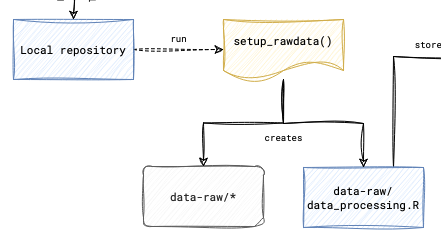
In the R console, from the package project, run:
This creates the folder data-raw/ and a processing script, data-raw/data_processing.R, with the steps the script should follow. Copy or move your raw files into data-raw/. The raw files are kept exactly as you received them and are never edited by hand. Every change happens in the script, so anyone can trace the published data back to the source.
Commit the raw files and push.
2.2 Clean and process the raw data
Open data-raw/data_processing.R. The script reads the raw files, cleans them into one or more tidy data frames and saves each one in two forms. usethis::use_data() writes an .rda file into data/, which is what the package loads. readr::write_csv() and openxlsx::write.xlsx() write a CSV and an XLSX file into inst/extdata/, which is what the website and the download table of the README link to. The template already holds the reading, saving and export blocks for one data frame named after the package. Add your cleaning steps in between, and keep that name for your main dataset or change it in all three export calls.
A package can hold more than one dataset. In that case, repeat the saving and export block for each data frame, so that each one lands in data/ and in inst/extdata/.
When the script is finished, run it from top to bottom with “Source” in the editor. Check the results in data/ and inst/extdata/, then commit the script and the generated files and push.
2.3 Write the data dictionary
The dictionary is the one place where variables are described. The help pages and the metadata are generated from it. Run:
setup_dictionary()This reads every dataset in data/ and writes data-raw/dictionary.csv with one row per variable. The columns are the folder, the file the variable belongs to, the variable name, its type and an empty description.
Open the file in RStudio or in a spreadsheet program and write a description for every variable. The description is the most important text of the whole package. A reader who has never seen your project should understand what a variable means from the description alone.
- Write one sentence in plain language.
- Say what was measured or recorded.
- Give the unit when there is one.
- Name the possible values when there are few.
Two descriptions that work:
- “Distance in meters from the household to the nearest water point.”
- “Whether the water point was working on the day of the visit (yes or no).”
Two that do not, because they repeat the variable name or stay vague:
- “The distance variable.”
- “Status.”
Leave no description empty. Keep the five columns washr wrote, in their order, and do not edit the type column, which washr fills from the data. If you edit the file in Excel, save it in the “CSV UTF-8” format, because the plain CSV format of Excel on Windows is not UTF-8.
Commit the dictionary and push.
2.4 When the data changes later
When the processing script changes and a variable is added, removed or changes its type, run:
update_dictionary()It adds a row for each new variable, removes the row of a variable that no longer exists, refreshes the types and keeps every description you wrote. Running setup_dictionary() again would stop, because the dictionary exists. After an update, run setup_roxygen() from the next chapter again, so that the help pages follow.
Your repository now holds the raw files, the processing script, the tidy datasets with their exports, and the dictionary, all under version control.