install.packages(c("usethis", "devtools", "washr"))1 Creating the package and its repository
Everything you publish lives in one R package, and the package lives in one Git repository on GitHub. This chapter creates both and connects them. You need R, RStudio, Git and a GitHub account, and you need to be a member of the GitHub organisation you publish under.
Note
openwashdata packages live in the openwashdata organisation, and Global Health Engineering packages in Global-Health-Engineering. If you are not a member yet, write to the team of the organisation and ask for an invitation.
Before you start, check that the usethis, devtools and washr packages are installed. All three are on CRAN:
Git needs your name and email, and usethis needs to know your GitHub account. usethis::git_sitrep() reports what is set and what is missing, and the usethis article Managing Git(Hub) credentials explains the setup.
1.1 Create the package
The package name is the name of the dataset, in lower case, with no dots or underscores. Choose it with care, because it becomes the repository name, the name people install and the name in every citation. In the R console, create the package and open it as a project:
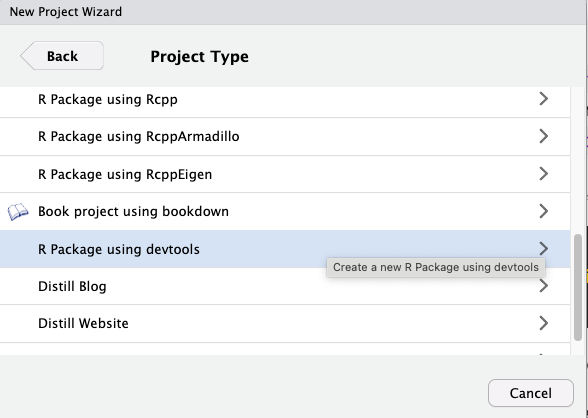
usethis::create_package("~/path/to/yourpackagename")RStudio opens the new project. The folder holds a DESCRIPTION file, an empty R/ folder and a NAMESPACE file. Everything else is added in the next chapters. The RStudio menu File > New Project > New Directory > R Package using devtools does the same.
1.2 Put it under version control
The project needs to be a Git repository with at least one commit before it can go to GitHub. Run:
usethis::use_git()usethis asks whether it may commit the files. Accept. It then asks to restart RStudio so that the Git tab appears. Accept this as well and wait for the restart.
1.3 Create the repository on GitHub
With the project under version control, one call creates the repository in your organisation, connects it to your project and pushes the first commit:
usethis::use_github(organisation = "openwashdata")Replace the organisation with the one you publish under. The repository is public, which is right for data that holds nothing confidential or personal. Chapter 2 covers that check before any data is pushed. The call needs a GitHub token with permission to create repositories in the organisation. usethis::gh_token_help() explains how to get one.
If the call fails, create the repository by hand. Go to the organisation page on GitHub, click “New repository”, give it the package name, keep it empty (no README, no .gitignore file, no license, they are added later) and create it. Then switch to the Terminal tab in RStudio, next to the Console, and connect the two, with ORGANISATION and REPO replaced:
git remote add origin "https://github.com/ORGANISATION/REPO.git"
git branch -M main
git push -u origin main
Afterwards, run usethis::use_github_links() once, so that DESCRIPTION names the repository. use_github() does this on its own.
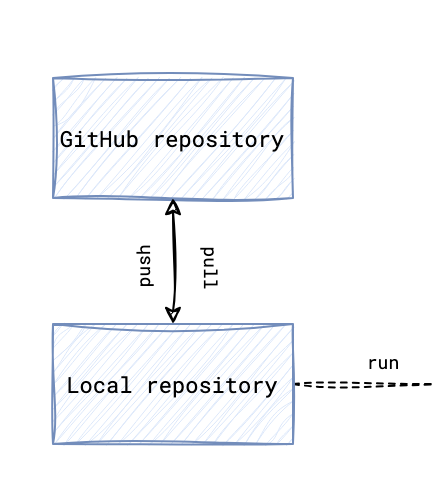
Either way, your local repository on your computer is now connected to the remote repository on GitHub, so you can push and pull changes and invite collaborators.
1.4 Add the check that runs on every push
washr writes a GitHub Actions workflow that runs R CMD check on every push and pull request, on macOS, Windows and three versions of R on Linux. The openwashdata review standard requires it, so add it now and the package meets that part of the standard from its first commit:
library(washr)
setup_ci()
The workflow lands in .github/workflows/R-CMD-check.yaml. Commit it and push.
1.5 Committing and pushing from RStudio
The chapters that follow end each step with a commit and a push. In RStudio, open the Git tab in the top right panel. Click “Pull” first, so that you have the latest changes. Tick the boxes next to the files you added or changed and click “Commit”. A window opens. Write a short message that says what changed, for example “Add raw data files”, and click “Commit”. Then click “Push” to upload the commit to GitHub.